




.jpg "Steal Brainrot Eggs")











Soflo Wheelie Life
The playing guidelines of Soflo Wheelie Life
Are you ready for a thrilling riding adventure in Soflo Wheelie Life? This game requires you to ride to the furthest distance and perform bike tricks.
Customizing your motorbike and helmet
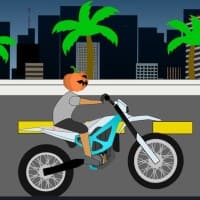
At the beginning of your exciting journey in this game, you are given the exhilarating opportunity to select your favorite motorbike from a diverse range of options. You can choose from street motorcycles, hyperbikes, BMX bikes, off-road bikes, cars, cruisers, and iconic choppers. In addition to selecting a motorbike, you also have the freedom to customize your helmet! You can choose from various helmet styles, including festive Christmas hats, robust off-road helmets, sleek full-face helmets, and even playful pumpkin hats. Your selection not only enhances your character's appearance but also adds a touch of personal flair.
Riding far
Once you have customized your bike and helmet to your liking, it is time to embark on your thrilling riding adventure! The goal is to ride your bike as far as possible without flipping over, testing your balance and control in various terrains. But the excitement does not stop at just distance. You can also showcase your skills by performing a variety of impressive riding tricks, such as bunny hops, wheelies, trackstands, foot jams, and manuals. These tricks not only add flair to your riding but also help you accumulate points, challenging you to do your absolute best to achieve the highest score possible. Besides, you can try playing Steal And Run, which is another engaging game on our website.
Control instruction
If you want to ride your bike forward, press the left mouse button, the D key, or the right arrow key.
If you want to change your bike, press the F key.
If you want to change your helmet, press the G key.
If you want to keep your balance, press the left arrow key or the A key.
If you want to ride your bike with no hands, press the E key.
If you want to knee-knock while riding the bike, press the S key.